
Private AI infrastructure
Secure Local LLM Deployment: Enterprise Hardening Guide
By Michael P. Goodman · Published · Updated · 11 min read
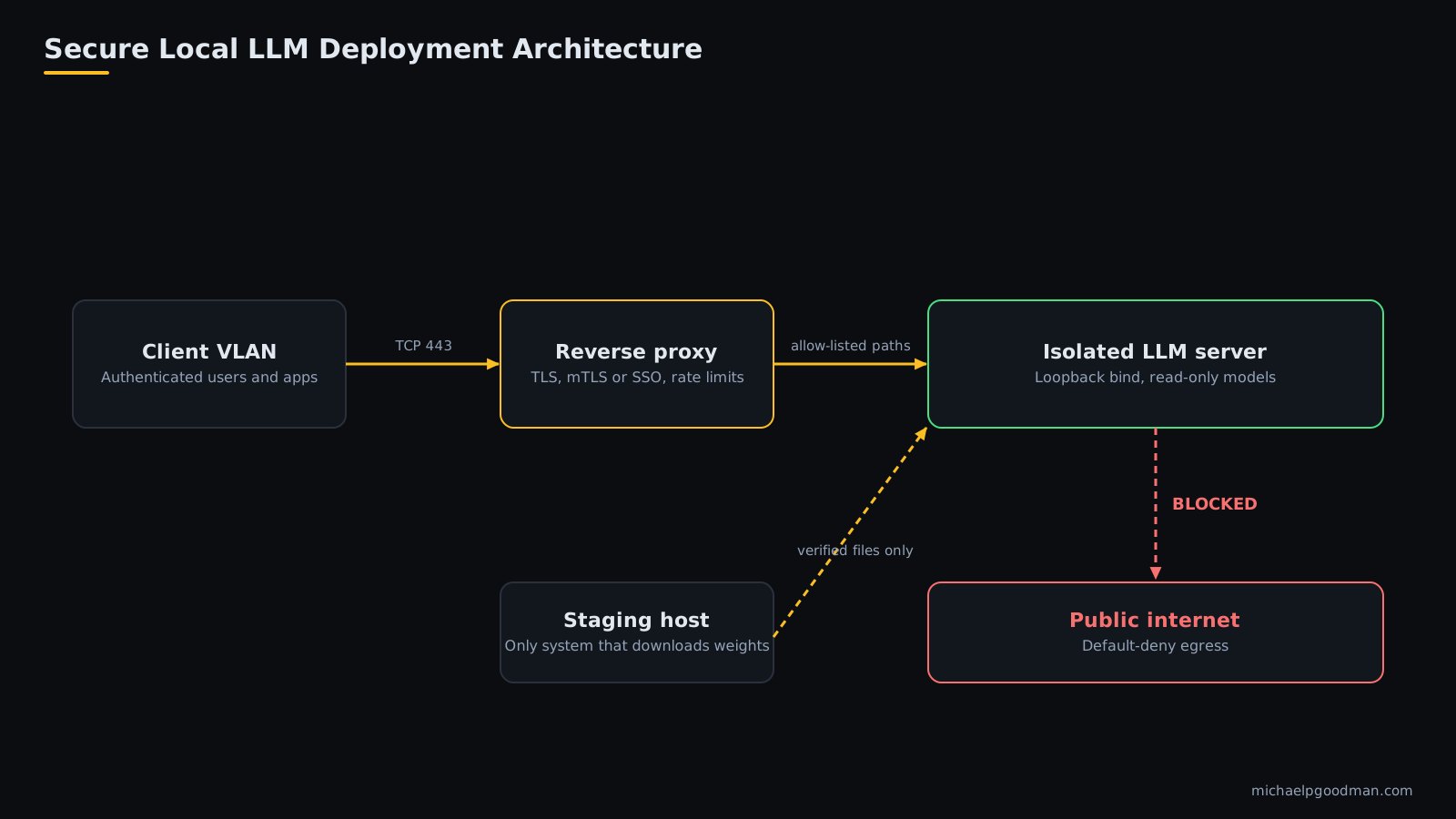
A secure local LLM deployment keeps model weights, prompts, and outputs on infrastructure you control, with no inbound exposure beyond an authenticated proxy and no unrestricted outbound access. Running a model locally does not make it secure by default. The runtime, network, model files, and logs each need explicit controls.
This guide covers every layer of a secure local LLM deployment, from host hardening to model verification, with configuration examples you can adapt. It reflects 28 years of building and securing infrastructure for organizations that cannot send sensitive data to public cloud APIs.
Key takeaways: secure local LLM deployment
- Bind the model runtime to loopback and put an authenticating proxy in front of it.
- Block all outbound traffic from the inference host except internal DNS, NTP, and a package mirror.
- Download model files only on a staging host, verify hashes, and prefer safetensors or GGUF.
- Log request metadata, not prompt content, unless an audit requirement says otherwise.
- Treat prompt injection and output handling as application risks that local hosting does not remove.
What is a secure local LLM deployment?
It is an on-premises or private-cloud inference stack where:
- Prompts, documents, and responses never leave your network boundary.
- Only authenticated, authorized clients can reach the inference API.
- Model files are verified, versioned, and stored read-only.
- Every request is logged without leaking sensitive content into the logs.
- The host receives patches on a defined schedule.
Why deploy an LLM locally instead of using a hosted API?
- Data residency: regulated data (legal, medical, financial, client records) stays in-house.
- Control: you choose model version, update timing, and retention.
- Cost predictability: fixed hardware cost instead of per-token billing at sustained volume.
- Availability: inference continues if an external provider has an outage.
What does local deployment not solve?
- Prompt injection and insecure output handling remain application-layer risks.
- Misconfigured runtimes can expose an unauthenticated API to the LAN.
- Untrusted model files can contain malicious code if loaded with unsafe formats.
- Insider access to prompts and logs still requires access control.
What threats should a local LLM deployment defend against?
Define the threats before choosing controls. The OWASP Top 10 for LLM Applications and the NIST AI Risk Management Framework provide formal taxonomies for these risks (OWASP, NIST).
| Threat | Example | Primary control |
|---|---|---|
| Unauthenticated API access | Runtime bound to 0.0.0.0 with no auth | Loopback bind, authenticating reverse proxy |
| Malicious model artifact | Pickle-based checkpoint executes code on load | Safetensors or GGUF only, hash verification, staging |
| Data exfiltration | Compromised host calls an external endpoint | Default-deny egress |
| Prompt injection | Retrieved document instructs the model to leak data | Least-privilege tools, output validation |
| Sensitive data in logs | Full prompts stored in plaintext | Metadata-only logging, encryption, retention limits |
| Resource exhaustion | One client saturates the GPU | Rate limits, concurrency caps, per-user quotas |
| Unpatched components | Known CVE in inference server or driver | Patch cadence, version pinning, staging |
What does a secure reference architecture look like?
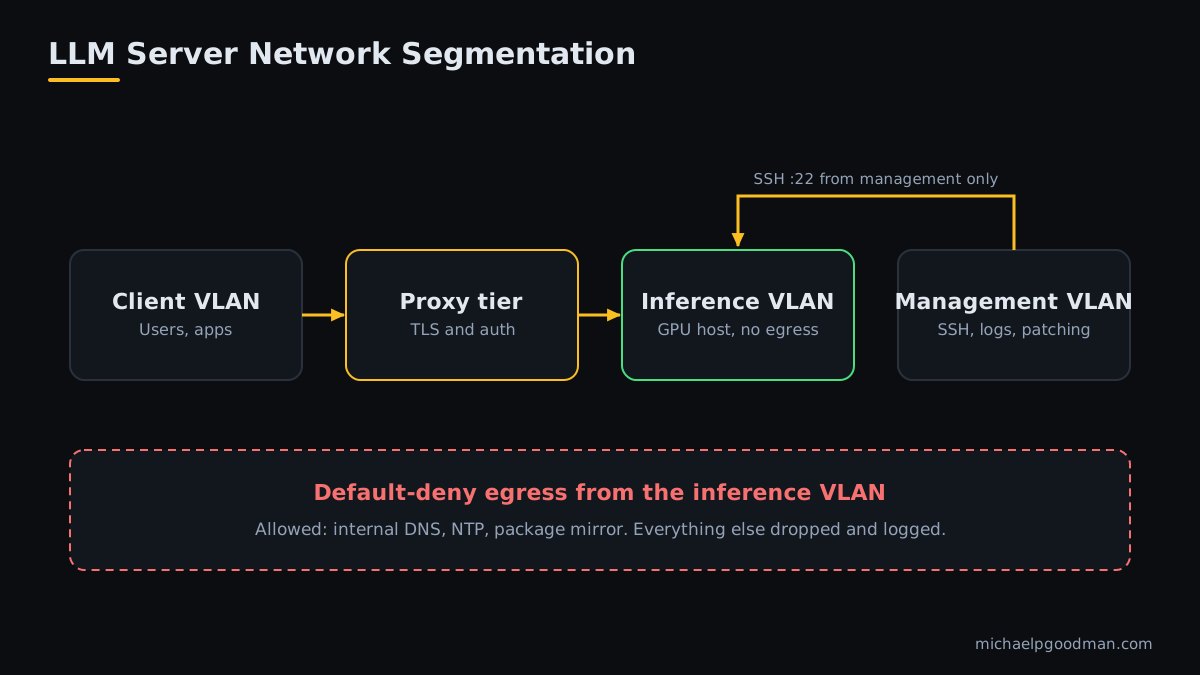
Separate the stack into network tiers so that a compromise of one tier does not expose the others.
- Client VLAN: users and applications. Can reach only the reverse proxy on TCP 443.
- Proxy tier: terminates TLS, enforces authentication, applies rate limits, and writes access logs.
- Inference VLAN: GPU host running the model runtime on loopback or a private interface, with no route to the internet.
- Management VLAN: administrator SSH, monitoring, and patch staging only.
- Model staging host: the only system allowed to download weights. It transfers verified files inward.
Virtualized deployments follow the same layout using separate virtual networks and hypervisor firewall rules. I used this tiered approach in the Project S.P.H.E.R.E. AI infrastructure case study.
How do you harden the host operating system?
- Use a minimal server install with no desktop environment and no unused services.
- Enable automatic security updates for the OS. Hold GPU driver and runtime updates for staged testing.
- Enforce SSH key authentication. Disable password login and direct root login.
- Enable full-disk encryption (LUKS) on volumes holding models, prompts, vector stores, and logs.
- Run the runtime as a dedicated unprivileged user with no shell.
- Enable mandatory access control (AppArmor or SELinux) in enforcing mode.
- Synchronize time from an internal NTP source for reliable log correlation.
Much of this baseline can be applied repeatably with configuration management. See my notes on IT infrastructure automation for how I keep server builds consistent.
Example: hardened systemd unit for Ollama
[Unit]
Description=Ollama inference server
After=network-online.target

[Service]
User=ollama
Group=ollama
ExecStart=/usr/local/bin/ollama serve
Environment="OLLAMA_HOST=127.0.0.1:11434"
Environment="OLLAMA_MODELS=/var/lib/ollama/models"
Restart=on-failure

NoNewPrivileges=true
ProtectSystem=strict
ProtectHome=true
PrivateTmp=true
ProtectKernelTunables=true
ProtectKernelModules=true
ProtectControlGroups=true
RestrictSUIDSGID=true
LockPersonality=true
CapabilityBoundingSet=
ReadWritePaths=/var/lib/ollama
RestrictAddressFamilies=AF_UNIX AF_INET AF_INET6

[Install]
WantedBy=multi-user.target
Test GPU access after applying these directives. Some driver configurations require additional device permissions.
How do you isolate the network?
- Bind to loopback. Ollama listens on 127.0.0.1:11434 by default, and the llama.cpp server also defaults to 127.0.0.1 (Ollama, llama.cpp). Changing the bind address to 0.0.0.0 exposes the API to every reachable host.
- Default-deny inbound. Allow only TCP 443 from the proxy and SSH from the management VLAN.
- Default-deny outbound. Block all egress from the inference host. Permit only internal DNS, internal NTP, and an internal package mirror.
- Disable runtime telemetry and online lookups where available. Set
HF_HUB_OFFLINE=1for Hugging Face tooling so libraries do not fetch from the internet at runtime.
Example: nftables policy for the inference host
table inet llm_host {
  chain input {
    type filter hook input priority 0; policy drop;
    iif lo accept
    ct state established,related accept
    ip saddr 10.20.0.10 tcp dport 443 accept     # reverse proxy
    ip saddr 10.99.0.0/24 tcp dport 22 accept    # management VLAN
  }
  chain output {
    type filter hook output priority 0; policy drop;
    oif lo accept
    ct state established,related accept
    ip daddr 10.99.0.53 udp dport 53 accept      # internal DNS
    ip daddr 10.99.0.123 udp dport 123 accept    # internal NTP
    ip daddr 10.99.0.80 tcp dport 443 accept     # internal package mirror
  }
}
Adjust the addresses to your environment, and log dropped packets so blocked egress attempts raise an alert.
How do you harden the inference runtime?
What are the key settings for each runtime?
| Runtime | Default exposure | Hardening actions |
|---|---|---|
| Ollama | Loopback, no built-in user authentication | Keep OLLAMA_HOST on loopback. Place an authenticating proxy in front for remote access. |
| llama.cpp server | Loopback by default | Use the API key option if exposed beyond loopback. Run as an unprivileged user. |
| vLLM | OpenAI-compatible HTTP server | Use the --api-key option, bind to a private interface, and front with a TLS proxy (vLLM docs). |
- Pin runtime versions. Do not auto-update production.
- Set maximum context length, maximum output tokens, and concurrency limits to bound resource use.
- Disable any model-pull or remote-registry features on the production host.
- If you use containers, run non-root with a read-only root filesystem, drop all capabilities, and mount model directories read-only.
How do you secure the model supply chain?
Model files are executable-adjacent inputs. Treat them like third-party software.
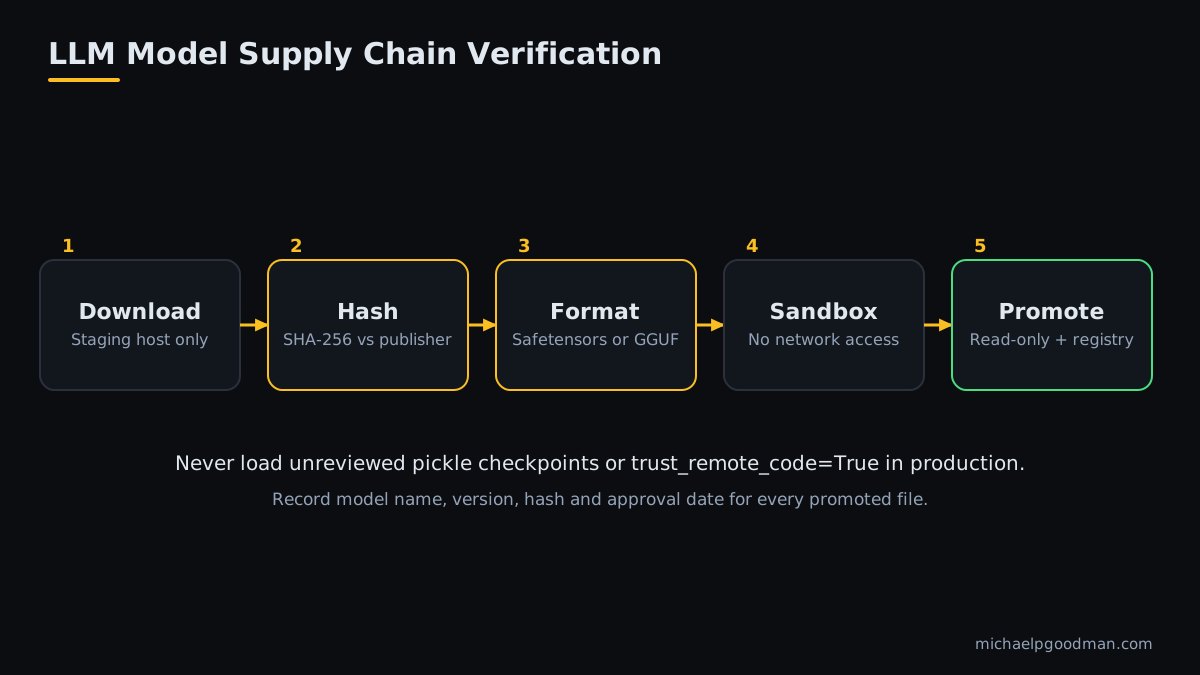
- Download only on the staging host, from the publisher's official repository.
- Record and verify the SHA-256 hash against the value published by the source.
- Prefer safe formats. Use safetensors or GGUF. Avoid pickle-based PyTorch checkpoints from untrusted sources, because unpickling can execute arbitrary code.
- Review the license for commercial use and redistribution restrictions.
- Test in an isolated sandbox with no network access before promotion.
- Promote to production by copying the verified file to a read-only location. Record the model name, version, hash, and approval date in a registry.
- Never run
trust_remote_code=Trueon unreviewed repositories in production.
sha256sum -c model.sha256
chown root:ollama /var/lib/ollama/models/model.gguf
chmod 0440 /var/lib/ollama/models/model.gguf
How do you authenticate and authorize clients?
Most local runtimes ship without user-level authentication. Add it at the proxy tier.
- mTLS or SSO (OIDC) for human users and internal applications.
- Per-client API keys stored in a secrets manager and rotated on a schedule.
- Role-based access: restrict which clients may call which models and endpoints.
- Block administrative endpoints (model pull, delete, create) at the proxy for all non-admin clients.
- Rate limit per client to protect GPU capacity.
Example: nginx proxy with client certificates and an endpoint allow-list
limit_req_zone $ssl_client_s_dn zone=llm:10m rate=5r/s;   # http context

server {
  listen 443 ssl;
  server_name llm.internal.example.com;

  ssl_certificate         /etc/ssl/llm/server.crt;
  ssl_certificate_key     /etc/ssl/llm/server.key;
  ssl_protocols           TLSv1.2 TLSv1.3;
  ssl_client_certificate  /etc/ssl/llm/internal-ca.crt;
  ssl_verify_client       on;

  location ~ ^/(api/chat|api/generate|v1/chat/completions)$ {
    limit_req zone=llm burst=10 nodelay;
    proxy_pass http://127.0.0.1:11434;
    proxy_read_timeout 300s;
    proxy_buffering off;
  }

  location / { return 403; }   # blocks pull, delete, create and all other paths
}
How do you protect data at rest and in transit?
- In transit: TLS 1.2 or higher between clients and proxy, and TLS or a loopback-only hop between proxy and runtime.
- At rest: LUKS encryption on volumes holding models, vector databases, conversation stores, and logs.
- Retention: define a maximum retention period for conversation history and delete on schedule.
- Classification: document which data classes may be sent to which model.
- Backups: encrypt backups and test restores.
How do you handle application-layer risks?
- Prompt injection: treat all retrieved and user-supplied text as untrusted input.
- Insecure output handling: never execute model output as code or shell commands without validation. Escape output before rendering it in HTML.
- Excessive agency: give tool-using agents the minimum permissions and require human approval for destructive or external actions.
- RAG access control: enforce document-level permissions at retrieval time, not only in the user interface.
- System prompt secrecy: do not store secrets or credentials in prompts.
The OWASP Top 10 for LLM Applications covers these categories in detail. If you are deciding who should own these controls, my article on choosing an AI transformation advisor or a fractional CTO explains how to assign decision rights.
What should you log and monitor on a local LLM?
- Log: timestamp, client identity, model name, endpoint, token counts, latency, and status code.
- Do not log by default: full prompts and completions. If an audit requires them, store them encrypted with restricted access and a fixed retention period.
- Forward logs to a central SIEM or log server on the management VLAN.
- Alert on: blocked egress attempts, repeated authentication failures, requests to blocked admin endpoints, GPU or memory saturation, and unexpected process launches.
- Monitor file integrity of model directories and runtime binaries.
How do you patch and maintain the deployment?
- Maintain a staging host identical to production.
- Apply OS, driver, and runtime updates on staging first, and run a fixed regression prompt set.
- Promote to production during a scheduled window with a rollback snapshot.
- Track security advisories for the runtime, GPU driver, container toolkit, and proxy.
- Review access lists, API keys, and certificates quarterly.
Production checklist for secure local LLM deployment
Use this list as a go-live gate. Every item should be verifiable by command, configuration file, or log entry.
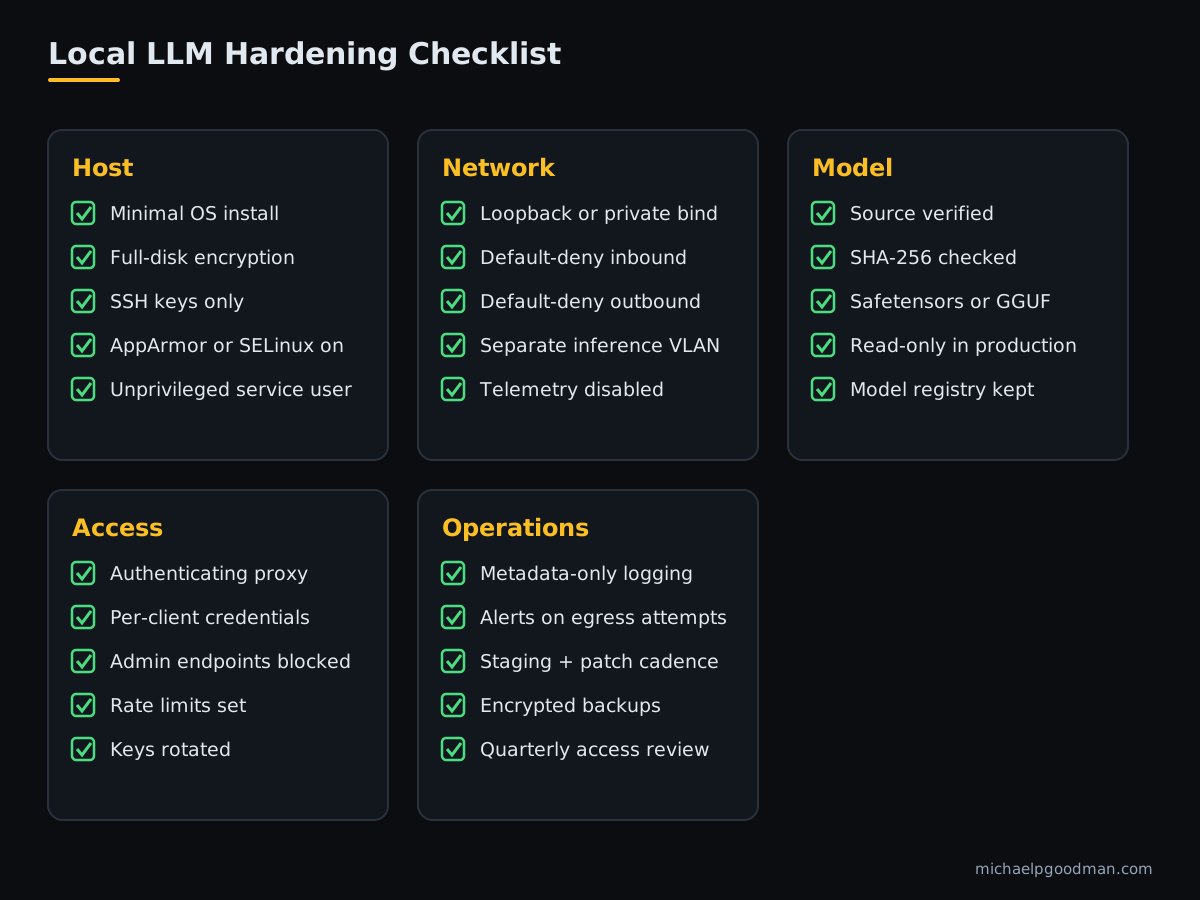
Host
- ☐ Minimal OS install, unused services removed
- ☐ Full-disk encryption enabled
- ☐ SSH keys only; root login disabled
- ☐ AppArmor or SELinux enforcing
- ☐ Runtime runs as an unprivileged service account
Network
- ☐ Runtime bound to loopback or a private interface
- ☐ Default-deny inbound firewall
- ☐ Default-deny outbound firewall
- ☐ Inference VLAN separated from client and management VLANs
Model
- ☐ Source verified; SHA-256 recorded and checked
- ☐ Safetensors or GGUF format only
- ☐ Model files read-only in production
- ☐ Model registry with version and approval date
Access
- ☐ Authenticating reverse proxy with TLS
- ☐ Per-client credentials, rotated
- ☐ Admin endpoints blocked for non-admins
- ☐ Rate limits and concurrency caps set
Operations
- ☐ Metadata-only logging to a central server
- ☐ Alerts for egress attempts and authentication failures
- ☐ Staging environment and patch cadence defined
- ☐ Encrypted, tested backups
If you want this built and documented for your environment, see my secure local LLM deployment services, or read more about my background.
Secure local LLM deployment FAQ
Is a local LLM more secure than a cloud LLM API?
Not automatically. A local deployment reduces third-party data exposure, but security depends on your network controls, authentication, patching, and logging. A misconfigured local server can be less secure than a well-run hosted service.
Does Ollama include authentication?
The standard Ollama server does not provide user-level authentication. Keep it bound to loopback and place an authenticating reverse proxy in front of it for any remote access.
What hardware does a secure local LLM deployment need?
Requirements depend on model size and quantization. The main constraints are GPU memory for the model plus context cache, and system RAM for any offloaded layers. Size hardware from the model's published memory requirements and your concurrency target.
Can a local LLM run fully air-gapped?
Yes. Transfer verified model files and updates on controlled media or through a one-way staging process, and disable all runtime network lookups so nothing attempts to reach the internet.
Are GGUF and safetensors files safe to load?
They are data-oriented formats that do not rely on arbitrary code execution during loading, unlike pickle-based checkpoints. You should still verify hashes and sources, and keep parsers and runtimes patched.
Conclusion: secure local LLM deployment
A secure local LLM deployment is a set of ordinary infrastructure controls applied to an unusual workload: isolated networks, verified inputs, authenticated access, minimal logging, and disciplined patching. Apply them in that order and verify each with evidence before go-live.
Building a document-answering system on top of a local model? Read the companion guide, Private RAG for Regulated Industries.
Sources: secure local LLM deployment
- OWASP GenAI Security Project. OWASP Top 10 for LLM Applications. Accessed October 18, 2026.
- National Institute of Standards and Technology. AI Risk Management Framework. Accessed October 18, 2026.
- Ollama. Ollama documentation and source repository. Accessed October 18, 2026.
- ggml-org. llama.cpp server documentation. Accessed October 18, 2026.
- vLLM Project. vLLM documentation: OpenAI-compatible server. Accessed October 18, 2026.
Verify default bind addresses, flags, and options against each project's documentation for the version you deploy.